
Data
Plan : FreeLoad a file, tell each column what it is, and prepare it for analysis without skewing the test.

Business problems
- A customer export arrives with empty cells, extreme amounts and categories that count only three people.
- The model fitted last month has to run on this month's file, with exactly the same preparation.
- A large file slows everything down, when a sample would do for exploring.
Academic problems
- Show on a concrete case why an imputation or a cap is estimated on the training sample alone.
- Have classic datasets at hand, including the Titanic in numeric, categorical and mixed versions, to teach PCA, MCA and FAMD.
Methods & guarantees
- The parameters of each transformation are estimated on the training rows, then applied to every row.
- The steps run in a fixed order, from column typing to one-hot encoding.
- Each transformation can be undone on its own, and all of them at once.
Start without a file
The Dataset panel of the Workspace tab loads ready-made synthetic datasets: random clouds with 5 or 12 variables, the Titanic in three versions (Titanic Data, Titanic Categ. Data for MCA, Titanic Mixed Data for FAMD), a marketing dataset for MMM, two survival datasets and two Hy-Performance datasets. Each one is a testing ground for the matching module before you bring your own data.
The guided scenarios go further: they load a dataset, set the roles and run the analysis in one click.
Import your file and tell each column what it is
Upload CSV accepts a UTF-8 file with a header row, separated by commas, semicolons, tabs or vertical bars. Columns named x, y, z, w, v5… land on the matching scene axes by themselves; otherwise the numeric columns fill the axes in file order.
Role Mapping designates the columns that play a part: the name shown next to the point (label), the colour (color), the group to compare (segment), the variable to explain (target), the treated group against the control (treatment), the train/test split (flag_test). Once Apply Roles is clicked, the tab header sums up the rows and columns retained, the roles assigned and the detected type of each column: numeric, categorical or boolean.
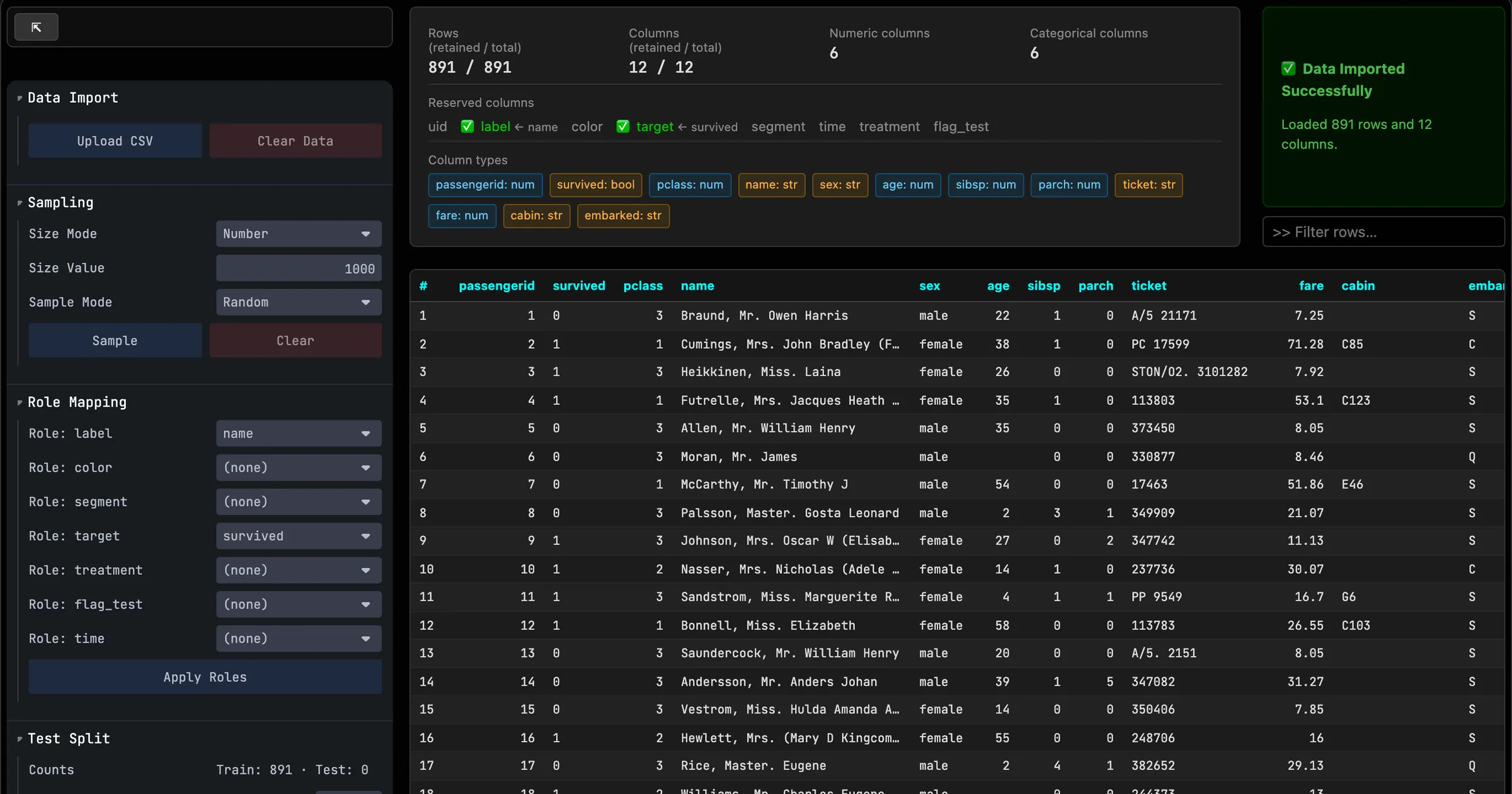
Work on a sample, set a test set aside
Sampling cuts a large file down to a number of rows or a proportion, drawn at random (Random) or taken from the start (Head) or the end (Tail) of the file, which matters for chronological data. Clear restores the full file.
If the file has no flag_test column, Random Split creates one from the share chosen in Test Size, and the Counts monitor shows the resulting split. Supervised models then train on one part and are judged on the other.
Prepare the data without skewing the test
The Preprocessing panel gathers the transformations that factor projections, clustering or supervised learning require: change a column's type or exclude it, take the logarithm, fill empty cells (Imputation), cap extreme values (Winsorization), cut a numeric variable into quantiles (Discretization), group rare categories (Category Binning), create indicator columns (One-Hot Encoding).
They apply in this fixed order, and their parameters (the median that fills a gap, the percentile that caps an amount) are computed on the training rows only. The test rows therefore have no say in the preparation applied to them. Keep Original Column keeps the source column next to the transformed one; Undo reverts one step, Clear Preprocessing reverts them all.
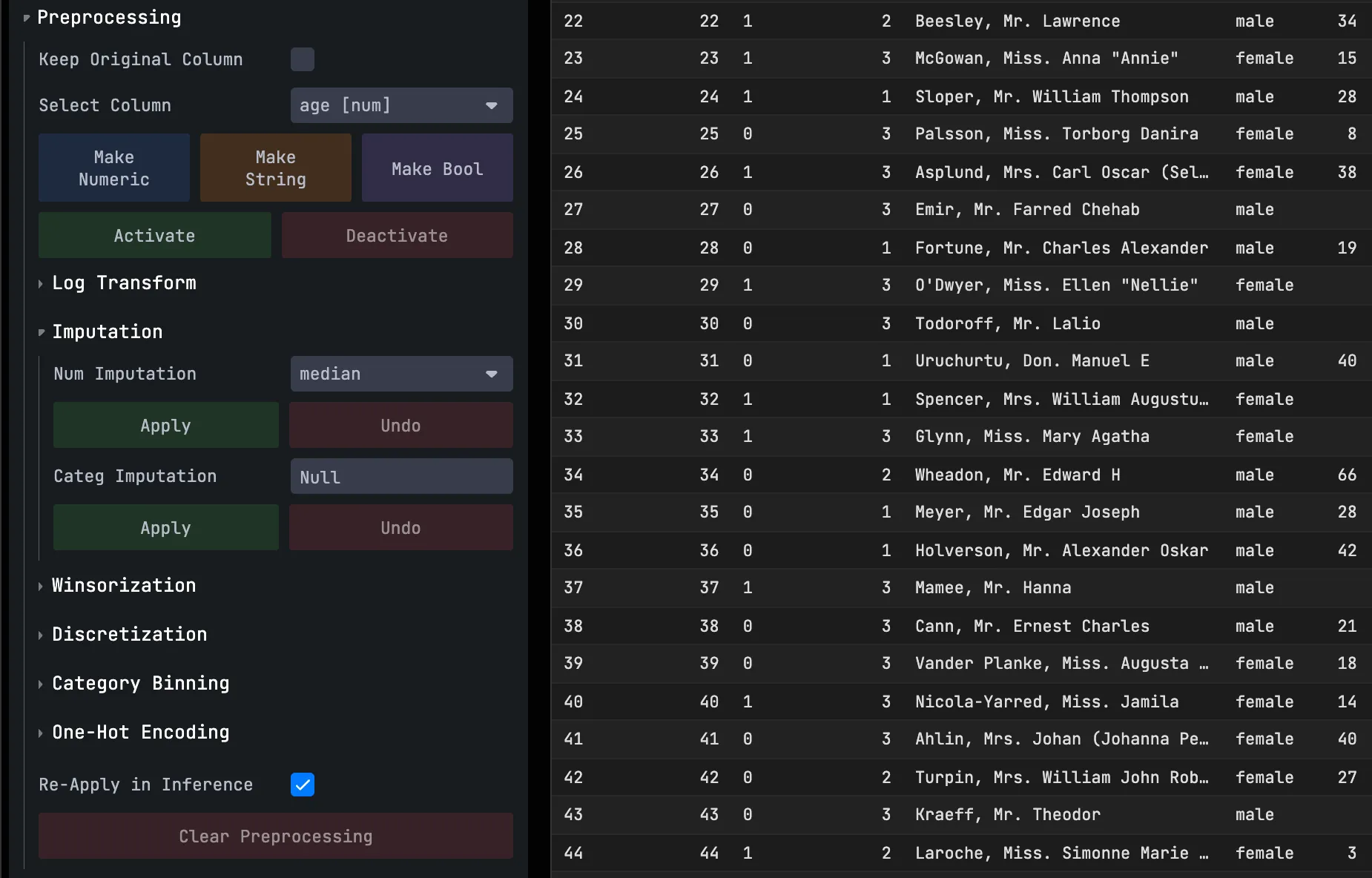
Replay the same preparation on new data
Re-Apply in Inference keeps the settings of each step. A factor, clustering or supervised model already trained can then run on a new file: the same medians, thresholds and groupings are applied to it, instead of being recomputed on it.
Try it on your own data
Everything runs in your browser: your data never leaves it.
Open TetrachoreUpdated 7 November 2026